Help
Data Export
You can export your workout data either through Apple Health or through the Zones app.
| App | Format | Data Range |
|---|---|---|
| Health | XML | All data |
| Zones | JSON | Per workout |
Exporting Data with Apple Health
You can export all of your Health data in XML format.
- Open the Apple Health app.
- Tap your profile icon.
- Select “Export All Health Data”
Exporting Data with Zones
You can export your workout data as a JSON file.
This can also be done through the Shortcuts app.
Zones version 9 or later is required to use this feature.
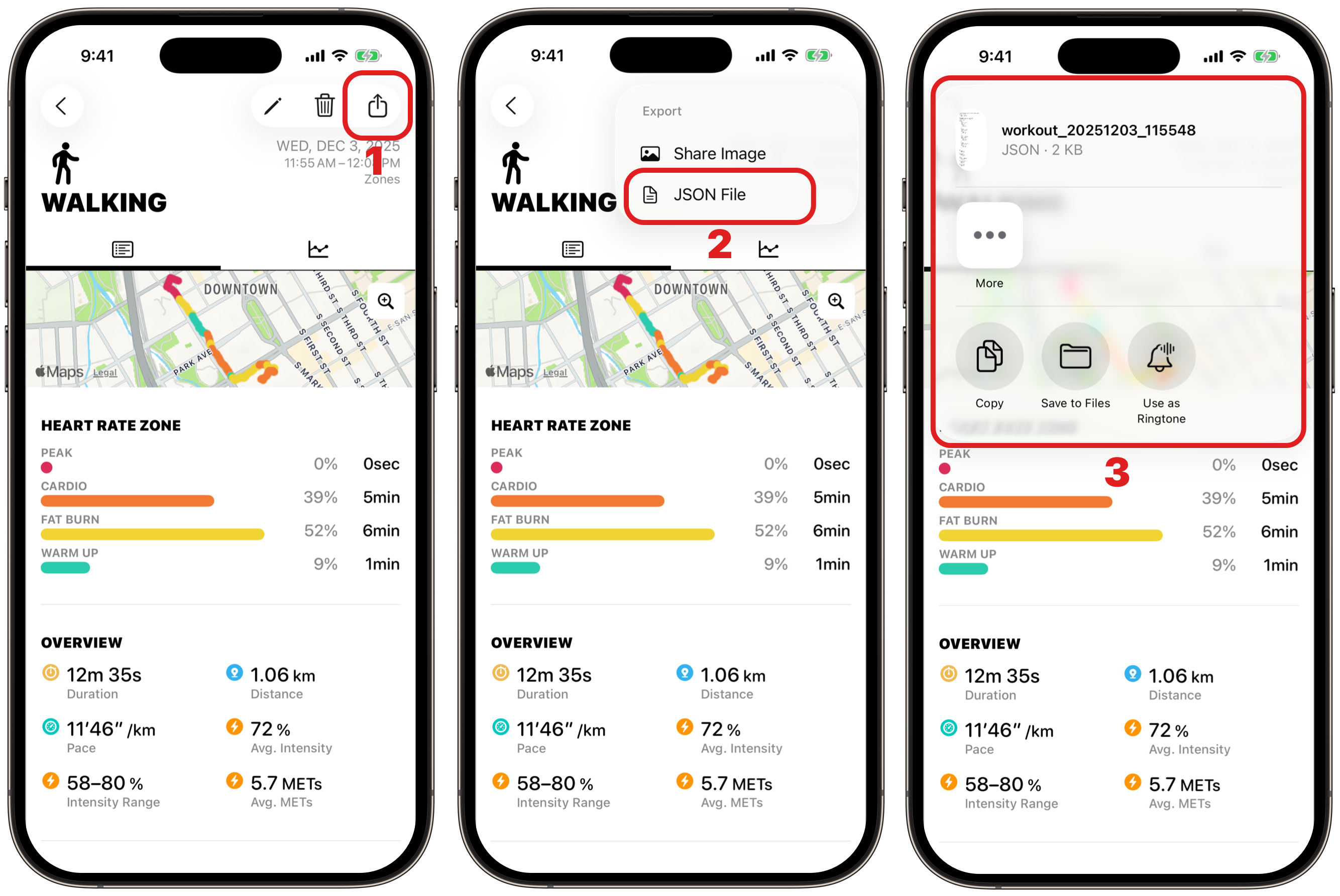
Exporting from the App
Steps
- On the workout screen, tap the export button.
- Select “JSON File”
- The share sheet will appear.
Exporting via Shortcuts
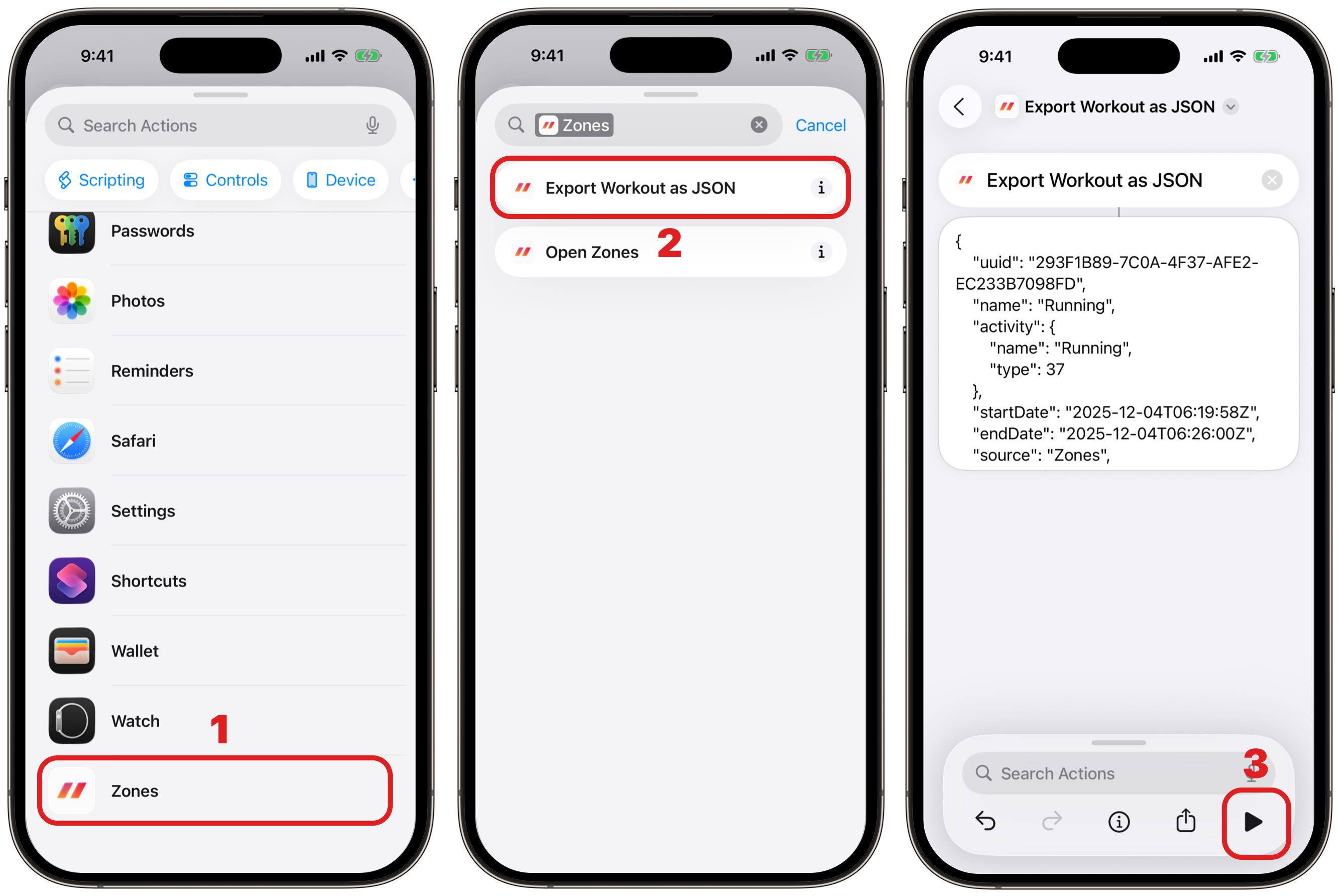
When using Shortcuts, the most recent workout will be exported.
Steps
- In the Shortcuts app, create a new shortcut and choose “Zones” from the action list.
- Select “Export Workout as JSON”
- Tap the Run button to export the JSON file.
JSON Sample
{
    "uuid": "293F1B89-7C0A-4F37-AFE2-EC233B7098FD",
    "name": "Running",
    "activity": {
        "name": "Running",
        "type": 37
    },
    "startDate": "2025-12-04T06:19:58Z",
    "endDate": "2025-12-04T06:26:00Z",
    "source": "Zones",
    "zones": {
        "zone4": {
            "name": "PEAK",
            "rate": 0.0,
            "time": {
                "value": 0,
                "unit": "sec"
            }
        },
        "zone3": {
            "name": "CARDIO",
            "rate": 1.0,
            "time": {
                "value": 362,
                "unit": "sec"
            }
        },
        "zone2": {
            "name": "FAT BURN",
            "rate": 0.0,
            "time": {
                "value": 0,
                "unit": "sec"
            }
        },
        "zone1": {
            "name": "WARM UP",
            "rate": 0.0,
            "time": {
                "value": 0,
                "unit": "sec"
            }
        }
    },
    "duration": {
        "value": 362,
        "unit": "sec"
    },
    "activeCalories": {
        "value": 42,
        "unit": "kcal"
    },
    "distance": {
        "value": 0.96,
        "unit": "km"
    },
    "pace": {
        "value": "6′13″",
        "unit": "/km"
    },
    "averageIntensity": {
        "value": 80,
        "unit": "%"
    },
    "minIntensity": {
        "value": 75,
        "unit": "%"
    },
    "maxIntensity": {
        "value": 83,
        "unit": "%"
    },
    "averageMETs": {
        "value": 9.6,
        "unit": "METs"
    },
    "step": {
        "value": 1079,
        "unit": "steps"
    },
    "cadence": {
        "value": 179,
        "unit": "spm"
    },
    "runningPower": {
        "value": 144,
        "unit": "W"
    },
    "runningVerticalOscillation": {
        "value": 7.9,
        "unit": "cm"
    },
    "runningGroundContactTime": {
        "value": 240,
        "unit": "ms"
    },
    "runningStrideLength": {
        "value": 0.9,
        "unit": "m"
    },
    "runningPace": {
        "value": "6′11″",
        "unit": "/km"
    },
    "averageHeartRate": {
        "value": 147,
        "unit": "bpm"
    },
    "minHeartRate": {
        "value": 139,
        "unit": "bpm"
    },
    "maxHeartRate": {
        "value": 155,
        "unit": "bpm"
    },
    "weather": {
        "condition": "Mostly Cloudy",
        "symbol": "cloud",
        "humidity": "57%",
        "pressure": "30.5 inHg",
        "temperature": "63°F"
    }
}